Podcasting in 2026 looks very different from the early days of USB mics and noisy spare rooms. AI text-to-speech now handles full episodes, host-style narration, sponsor reads, multilingual versions, and short promo clips with a level of realism that would have sounded impossible just a few years ago. For solo creators, small production teams, and indie networks, the right TTS tool can cut production hours, unlock new languages, and turn show notes into finished audio without a single recording session.
This guide compares the best TTS for podcasts across six tools that consistently come up in creator workflows: ElevenLabs, Murf AI, Speechify, Descript, LOVO AI, and Fliki. We focus on AI voice quality, podcast-specific features, licensing for monetized shows, and how each tool fits into a real production pipeline.
Affiliate disclosure: ttscompared.com may earn a commission when you sign up through links in this article. This never changes our editorial picks or the order in which we rank tools. We recommend based on podcast fit, not payouts.
Quick Recommendations
If you want the short version, here are the picks we stand behind for podcast workflows in 2026:
- Best overall AI voice for podcasts: ElevenLabs for realistic narration, voice cloning, and multilingual dubbing.
- Best browser voiceover studio for creators and teams: Murf AI for intros, outros, and sponsor reads without touching code, with team collaboration on higher plans.
- Best for turning scripts, research, and show notes into audio: Speechify for prep, listening, and script review (with Studio or API as the creation layer).
- Best podcast editor to pair with AI voice (secondary): Descript for transcription-based editing, filler removal, and Overdub touch-ups.
- Best for promos and audiograms (secondary): LOVO AI for short narrated social clips.
- Best for script-to-clip repurposing (secondary): Fliki for turning episode highlights into narrated video.
Default recommendation: For most podcast teams, start with ElevenLabs for realistic episode narration, voice cloning, and multilingual podcast versions. Choose Murf for team voiceover production when you need a browser studio for sponsor reads, approvals, and repeatable brand voices.
ElevenLabs, Murf AI, and Speechify are our primary picks. Descript, LOVO AI, and Fliki are workflow tools we recommend around your main TTS engine, not as full podcast voice generators on their own.
Before estimating total production cost, check our TTS pricing comparison for free tiers, paid quotas, API access, commercial-use rules, and voice-cloning availability across 12 tools.
Comparison Table: Best TTS for Podcasts at a Glance
Pricing reflects publicly listed plans checked in July 2026. Plans and promotional rates change, so always open the official pricing page before subscribing. Murf's pricing page can change by region and billing cycle, so tier names use "about" language.
| Tool | Best for | Starting price | Podcast fit | Voice cloning | Best CTA |
|---|---|---|---|---|---|
| ElevenLabs | Realistic AI narration and host cloning | Free; Starter $6/mo | Full episodes, multilingual dubs, API pipelines | Instant + Professional | See ElevenLabs plans |
| Murf AI | Browser voiceover studio for creators and teams | Creator about $19/mo annually | Intros, outros, sponsor reads, training narration | Yes, on higher tiers | See Murf AI plans |
| Speechify | Listening to scripts, research, and show notes | Free; Premium $29/mo | Script prep and review (Studio/API for creation) | Available via Studio/API | See Speechify plans |
| Descript | Podcast editing with AI voice features | Paid tiers on official pricing page | Editing around TTS output, transcription, Overdub | Overdub (cloned voice) | See Descript plans |
| LOVO AI | Promos, audiograms, narrated clips | Basic about $24 to $29/mo | Short-form podcast marketing assets | Yes, on Pro tiers | See LOVO plans |
| Fliki | Script-to-clip video repurposing | Paid tiers on official pricing page | Social clips from episode highlights | Yes, with cloning add-on | See Fliki plans |
Podcast Episode Stress Test
Podcast TTS needs to survive longer listening sessions than a social clip. Before choosing a tool, generate a realistic 8- to 12-minute segment and score it like this.
| Test Area | What To Check | Why It Matters For Podcasts | Strong Starting Points |
|---|---|---|---|
| Host trust | Does the voice still feel credible after 10 minutes? | Listeners build a relationship with the host voice | ElevenLabs, Murf |
| Sponsor read energy | Can the voice sound natural without overacting? | Ads need clarity and trust, not drama | Murf, ElevenLabs |
| Names and show terms | Can recurring names be fixed consistently? | Mispronouncing a host, guest, or sponsor hurts credibility | Murf, Descript, ElevenLabs |
| Editing handoff | Can the audio move cleanly into your editor? | Most podcasts still need trimming, mixing, and assembly | Descript, Murf |
| Multilingual clips | Can you make short localized promos? | Many shows test new audiences with clips before full dubs | ElevenLabs, LOVO, Fliki |
| Monthly volume | Can the plan cover full episodes plus retakes? | Long episodes consume credits fast | ElevenLabs, Speechify API |
Recommended Test Script
Use one real intro, one sponsor-style paragraph, one guest bio, one listener question, and one outro. Include your show name, a difficult guest name, a URL, and a call to action. If the tool cannot handle those lines cleanly, it will not get easier during a full episode.
What to Look For in Podcast TTS
A podcast is not a YouTube voiceover, a corporate explainer, or a robotic reading app. It is intimate audio that a listener may have in their ears for thirty to ninety minutes. That shapes what matters in a TTS tool.
Voice realism and emotional range. Listeners will forgive a flat AI voice in a 30-second ad. They will not forgive it for a full episode. Look for natural pacing, breath, and emotional inflection.
Voice cloning options. Instant cloning is fast and good enough for promos and drafts. Professional cloning, where the platform trains a higher-fidelity model from longer samples, is the version you want for a host voice that needs to carry a full show.
Commercial licensing. This is the single most overlooked detail by new creators. If your podcast runs sponsorships, ads, or paid subscriptions, you need a plan that explicitly grants commercial use. Free tiers almost never do.
Multilingual and dubbing support. If you want Spanish, Portuguese, German, or Japanese versions of your show, you want a tool with strong dubbing and multilingual output rather than bolt-on translation.
Credits and character limits. A typical 30-minute episode runs around 4,500 to 5,500 words, which translates to roughly 28,000 to 35,000 characters. Match plan limits to your release cadence.
Workflow fit. A browser studio is great for non-technical creators. An API is essential for production teams that batch episodes or automate localization. A reader app is what you want for prep, not production.
1. ElevenLabs: Best for Realistic AI Narration and Voice Cloning
ElevenLabs is the default answer for podcasters who want AI voice that does not sound like AI. It leads the field on realism, supports both instant and Professional Voice Cloning, and offers a Dubbing Studio that produces clean multilingual versions of episodes.
Why it works for podcasts. ElevenLabs handles full-episode narration, host voice cloning for solo shows, audiobook-style intros, and API-driven production for networks releasing multiple shows per week. The Studio and Productions tools are built for long-form audio rather than short clips.
Plans and pricing. The Free plan includes 10,000 credits per month and is enough to test voices and short clips. Starter is $6 per month and adds a commercial license and instant voice cloning with 30,000 credits, which is a strong entry point for monetized indie podcasters. Creator is $22 per month and adds Professional Voice Cloning along with 121,000 credits, which is the sweet spot for a weekly host-cloned show. Pro at $99, Scale at $299, and Business at $990 scale up credits and audio quality for production teams and networks. See ElevenLabs pricing for the latest tier details.
Pros for podcasters: best-in-class voice realism, strong cloning, multilingual dubbing, real API, commercial license on paid tiers.
Cons: credits can disappear quickly on long episodes, and the dashboard has a learning curve compared to simpler studio tools.
For closer head-to-heads, see our ElevenLabs vs Murf and ElevenLabs vs LOVO comparisons, or look at the best free ElevenLabs alternatives if you want to test similar tools.
2. Murf AI: Best Browser Voiceover Studio for Podcasters
Murf AI is the tool we recommend when a creator or small team wants a polished voiceover studio in the browser rather than a developer-first API. The voice library is broad, the editor is genuinely usable, and team features make it a sensible pick for shows produced by more than one person.
Why it works for podcasts. Murf shines for intros, outros, sponsor reads, and training- or explainer-style episodes where you want consistent narration without sitting down to record. The studio includes pacing, emphasis, and pronunciation controls that matter for podcast delivery, plus integrations and an API on higher tiers.
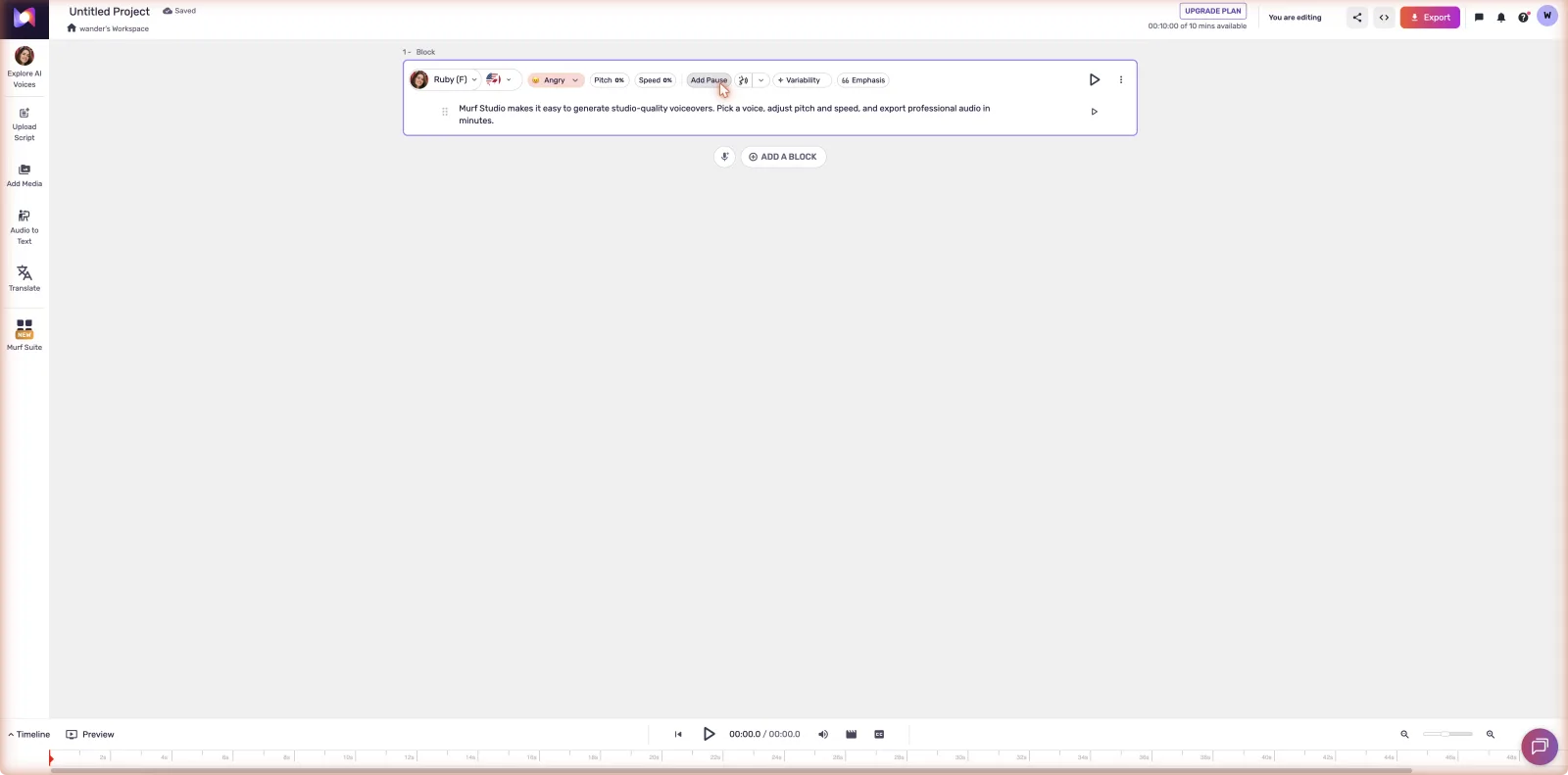
Plans and pricing. Murf's free testing tier lets you try voices but is not licensed for commercial production. The Creator plan is about $19 per month billed annually, or about $29 month-to-month, and includes commercial use plus downloadable voiceover output, which is what most independent podcasters need. The Business plan is about $66 per month annually, or about $99 monthly, and adds higher volume, team collaboration, integrations, and access to voice cloning and API features. Enterprise is custom-quoted. Confirm the exact tier names and current pricing on the Murf pricing page.
Pros for podcasters: strong voiceover-focused editor, clean commercial licensing on Creator, team features for collaborative shows, browser-first workflow.
Cons: less hyper-realistic on long-form narration than ElevenLabs, and developer features are gated to higher tiers.
3. Speechify: Best for Turning Scripts and Show Notes into Audio
Speechify sits in an interesting place in the podcast stack. It is best known as a reader app: paste in a script, PDF, or research doc and have it read back to you at variable speed. For podcasters, that is genuinely useful in pre-production, not just as a creator tool.
Where Premium fits. The Premium plan at $29 per month on the official pricing page is a listening and productivity tool. It includes 1,000+ voices, 60+ languages, AI summaries, and cloud integrations. Hosts use it to review drafts on the move, listen back to research, and proof show notes before recording. That is a real workflow win, but it is not a podcast voiceover production plan.
Where Studio and API fit. Speechify also sells Speechify Studio and the Speechify API as separate products with separate pricing. These are the creation-oriented tools a podcaster needs for actually generating episode voiceovers, and Speechify lists AI Podcasts as a use case in that context. If you are buying Speechify to make a podcast rather than to consume one, Studio or API is what you want. The reader Premium plan does not include full creator Studio or API functionality. See Speechify pricing for the current breakdown.
Pros for podcasters: excellent prep workflow, broad voice and language library, clear use case for converting written research to audio.
Cons: the product split between Premium reader and Studio/API can confuse new buyers; for production needs, plan budget around the Studio or API tier rather than the $29 plan.
4. Descript: Best Editing Companion for AI-Voiced Podcasts
Descript is not a pure TTS engine, and we want to be precise about that. It is a podcast editing platform with AI voice features built in. You edit audio by editing a transcript, remove filler words with a click, and use Overdub to patch lines in a cloned version of your own voice.
Why it pairs well with TTS. Most podcasters who use AI voice do not generate an episode and ship it untouched. They generate, edit, restructure, drop in cleaner takes, and tighten pacing. Descript is the tool that handles that final mile, including for episodes that started life in ElevenLabs or Murf.
Plans and pricing. Descript offers a free tier and several paid plans aimed at creators and teams. See the Descript pricing page for current tier names and rates. Overdub voice cloning availability depends on plan.
Pros for podcasters: transcript-based editing is genuinely faster, Overdub is useful for fixing flubbed lines, strong multitrack support.
Cons: not the right tool to generate full episodes from scratch; treat it as the editor around your TTS engine.
5. LOVO AI: Best for Podcast Promos and Audiograms
LOVO AI is a voiceover studio that we recommend specifically for short-form podcast marketing assets rather than full episode production. Think 60-second trailers, audiograms for Instagram and LinkedIn, narrated YouTube Shorts, and multilingual promo clips.
Why it works for promos. The voice library covers a wide range of styles, the editor is light, and the output is well suited to short clips where you want variety and quick turnaround.
Plans and pricing. Pricing varies by billing cycle and current promotions. Basic runs about $24 to $29 per month, Pro runs about $24 to $48 per month, and Pro+ runs about $75 to $149 per month depending on annual versus monthly billing. Confirm tier details on the LOVO pricing page.
Pros for podcasters: great for repurposed clips, multilingual promo voiceover, simple workflow.
Cons: not built for long-form podcast production; pair it with a primary TTS tool for full episodes.
If you are weighing LOVO against the realism leader, our ElevenLabs vs LOVO comparison breaks down the differences.
6. Fliki: Best for Script-to-Clip Repurposing
Fliki is video-first by design. It turns scripts into narrated video clips with stock visuals, captions, and AI voices. For podcasters, that is a repurposing tool, not a production tool.
Why it works for repurposing. A 60-minute episode is content gold for social, but only if you can package highlights quickly. Fliki lets you paste a transcript segment, pick a voice, and export a captioned clip in minutes. It works well for episode teasers, quote cards with voiceover, and short-form distribution across TikTok, Reels, and Shorts.
Plans and pricing. Fliki offers a free tier and paid plans aimed at creators and teams. See Fliki pricing for current tier details.
Pros for podcasters: fast clip production, captions and visuals built in, useful for marketing.
Cons: not designed for full podcast episode generation; treat it strictly as a repurposing layer.
How to Choose by Podcast Workflow
- Solo host wanting a cloned version of your own voice: ElevenLabs Creator. Professional Voice Cloning is the differentiator.
- Two- to five-person team producing a weekly show in a browser: Murf AI Creator or Business depending on collaboration needs.
- Researcher or host who wants to listen to scripts and notes on the go: Speechify Premium.
- Production team or network needing voiceover at scale: Speechify Studio or API, or ElevenLabs Pro/Scale with the API.
- Editing AI-generated audio into a polished episode: Descript paired with ElevenLabs or Murf output.
- Marketing your podcast with promos, audiograms, and social clips: LOVO AI for audio-led promos, Fliki for video-led clips.
- Going multilingual: ElevenLabs Dubbing Studio for episode-level translation, Murf or LOVO for shorter localized assets.
Production Workflow For AI-Voiced Podcasts
Use a repeatable workflow before replacing a recording session:
1. Write the episode script with host, sponsor, and segment labels. 2. Generate a short test with the exact voice and plan you expect to use. 3. Review pronunciation, pacing, emotional tone, and listener fatigue. 4. Export audio into your real editor, not just the tool preview. 5. Add music, compression, and loudness normalization. 6. Check commercial rights for sponsorships and paid feeds. 7. Save the tool, voice, plan, and generation date with the episode notes.
This makes AI voice easier to defend editorially. It also prevents a common failure: choosing the voice from a demo, then discovering it sounds wrong after mixing, ads, and full episode pacing.
Related Comparisons
If you want to go deeper on specific matchups, these are the most useful next reads:
- ElevenLabs vs Murf
- ElevenLabs vs LOVO
- Best AI text-to-speech for YouTube
- Best free ElevenLabs alternatives
- PlayHT alternatives 2026 if you were a former PlayHT user looking for a replacement after its reported late-2025 shutdown
Podcast teams that also publish scripted explainers, intros, or educational clips should compare broader AI narration software before locking into a podcast-only workflow.
FAQ
Can I use AI TTS voices commercially on a monetized podcast?
Yes, on the right plan. ElevenLabs grants commercial license starting at Starter ($6/mo). Murf grants commercial use on its Creator plan. Speechify Studio and API offer commercial output. Free tiers generally do not include commercial rights, so upgrade before you accept your first sponsor.
Will my listeners be able to tell my podcast uses AI voices?
With the top tools and a cloned host voice, most casual listeners will not flag it. Trained ears can still spot AI on long-form content, particularly during emotional or unscripted moments. Disclose AI use when it matters editorially.
What is the difference between instant and Professional Voice Cloning?
Instant cloning takes a short sample (often under a minute) and produces a usable voice quickly. Professional cloning trains a higher-fidelity model from longer, cleaner samples and is the version you want for a recurring host voice across full episodes.
Is Speechify's $29 Premium plan enough to create podcast voiceovers?
No. Premium is the reader and listening plan. For actually generating podcast voiceovers, look at Speechify Studio or the Speechify API, which are separate products with separate pricing.
Is Descript a TTS tool or a podcast editor?
Descript is a podcast editing platform that includes AI voice features like Overdub. Use it to edit and polish AI-generated audio, not to generate full episodes from a script.
How many credits do I need for a typical episode?
A 30-minute episode is roughly 28,000 to 35,000 characters. ElevenLabs Creator's 121,000 credits comfortably covers three to four episodes per month at that length, with headroom for promos and retakes.
Which tool supports the most languages for multilingual episodes?
Speechify advertises 60+ languages and ElevenLabs offers strong multilingual dubbing through Dubbing Studio. For full episode translation, ElevenLabs is our pick. For short multilingual promos, LOVO is a fast option.
Do I need an API, or is a browser studio enough?
For one show released weekly, a browser studio is enough. For networks, automated localization, or batch production across multiple shows, an API (ElevenLabs or Speechify) saves serious time.
Final Verdict
For most podcasters in 2026, ElevenLabs is the best TTS for podcasts thanks to its realism, host voice cloning, and multilingual dubbing. Murf AI is the best browser voiceover studio if you want a clean editor and team-friendly workflow without an API. Speechify earns a spot for converting scripts, research, and show notes into audio in pre-production, with Studio or API as the right path if you want to generate episodes inside the Speechify ecosystem.
Around those three, use Descript to edit, LOVO AI for promos and audiograms, and Fliki to repurpose episode highlights into short video. Always open the official pricing page before subscribing so you can match the right tier to your release cadence and licensing needs.
Short answer: ElevenLabs is the best TTS for podcasts when realism, cloning, and multilingual episodes matter. Murf is better for browser-based sponsor reads and structured narration, Speechify helps with script listening and API workflows, and Descript, LOVO, and Fliki work best as editing or promo layers around the main voice tool.